Professional Learning Plan

Media Center Description
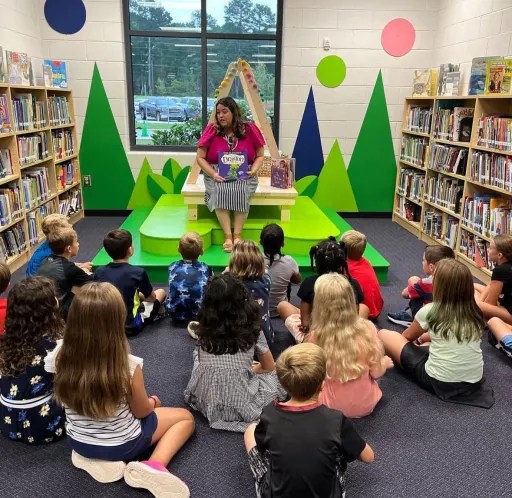
Since its opening in 2018, the media center at Dove Creek Elementary School has been a favorite spot for students and visitors. It is the first classroom you see when you walk into the school, and it is always inviting. The large windows give you a peek inside, where the vibrant and welcoming space makes you want to step in and explore. The entrance has custom-made trees that add a fun, whimsical feel, leading you to bookshelves filled with themed books that match the current holidays, celebrations, or upcoming author visits. This setup keeps things fresh and exciting, encouraging students to dive into new topics and genres.
Jennifer, the media specialist, has been with the school since day one. She meets with all students once every two weeks to provide lessons and activities that are both educational and engaging, fostering a love for reading and learning. The media center hosts a diverse collection of books that cater to all ages and interests, ensuring that every student can find something that captivates their interests. In addition to the diverse book collection, the media center also houses a makerspace area for STEM-based activities. This space allows students to engage in hands-on learning, encouraging creativity and critical thinking.
The media center also has a book room filled with leveled readers, which teachers can check out to support their Daily 5 Reading groups, providing targeted reading practice for students at various levels. The media center also hosts the Dragon Den News filmed by groups of fifth graders who work on their communication skills and confidence to deliver the news to the school daily. Overall, the media center at Dove Creek Elementary School is much more than just a place to borrow books. It’s a lively and essential part of the school community, supporting various educational activities. It helps students develop a love for reading and learning, where curiosity and creativity thrive.
The media center at Dove Creek Elementary School offers a variety of activities and resources to support learning and creativity. During biweekly lessons, students can be found engaging in novel engineering lessons, makerspace projects, 3D modeling tasks, or working with a green screen for video projects. Students are also able to sign up for a variety of extracurricular activities hosted by the media specialist such as Lego Club, Dragon Den News, or Page Turners Club. Jennifer also plans special events including author visits and book fairs. Students have access to PebbleGo, Galileo, the Sora eBook app, and the Destiny library catalog for research and reading. There are also leveled readers for different reading levels and a professional section with resources for teachers.
Media Specialist Information
Jennifer Mellina
jmellina@oconeeschools.org
Georgia Certification ID# 1348894
Professional Learning Objectives
Objective 1: Digital Citizenship Education
By May 2025, create a set of instructional materials to educate students on distinguishing between trustworthy and untrustworthy information on the web. These materials will include modules on recognizing credible sources, fact-checking, avoiding misinformation, and identifying AI-generated images or photos. Collaborate with educators to ensure the resources are accurate and effective, equipping students with critical thinking skills to analyze images and text for authenticity.
Objective 2: Integrating Core Subjects
By late July 2025, create and distribute a survey for teachers to complete at the beginning of the school year. This survey will inform the media specialist of core subject lessons they would like integrated into media library lessons for their students. Collaborate with the media specialist and teachers to ensure the survey addresses relevant core subjects and integration needs, enhancing the media library lessons accordingly.
Objective 3: Research and Skills
By May 2025, create a collection of resources for students that focuses on research and keyboarding skills. These resources will cover topics such as copyright, plagiarism, fair use, public domain images, and creating citations. Collaborate with educators to ensure the resources are comprehensive and effective, equipping students with essential skills for academic success.
Professional Learning Plan
Timetable of Activities
March – May 2025: Create resources to educate students on how to differentiate between trustworthy and untrustworthy information online. Also, create a collection of research and keyboarding resources for students. Share these with the media specialist and teachers.
July 2025: Send out a survey to homeroom teachers at the beginning of the school year to gather information for the media specialist on which core subject lessons they would like integrated into media library lessons for the students.
August 2025: Collect the data and share the findings with the media specialist.
September 2025 – May 2026: The media specialist integrates the core subjects into more of the media center lessons. Teachers utilize the digital citizenship, research, and keyboarding resources provided by instructional technologists.
Artifacts
Artifact 1: Digital Citizenship Resources (Summative Evaluation)
The media specialist or homeroom teachers can use the Artificial Intelligence and Digital Citizenship slideshow to teach students how to differentiate between real images and images made with Artificial Intelligence. There is also a review game about digital citizenship concepts and an infographic to hang up in the classroom to remind students about digital citizenship best practices.
Artificial Intelligence and Digital Citizenship– slideshow of information and review games
Digital Citizenship Educational Infographic
Artifact 2: Survey (Formative Evaluation)
The media specialist will distribute, via email, a survey to homeroom teachers to complete before beginning the new school year with students. The survey will provide the media specialist information on which core subject lessons they would like to see incorporated into media library sessions for the students.
Media Center Lesson Integration Survey
Artifact 3: Research and Skills (Summative Evaluation)
Research Skills: Copyright, Plagiarism, Fair Use, Public Domain Images, Use of AI, and Creating Citations
- Copyright & Creativity offers engaging lessons and videos on copyright basics, fair use, and public domain works tailored for elementary students. Copyright & Creativity
- ReadWriteThink offers interactive activities to help students understand copyright and how it affects their use of resources. This lesson teaches students how to use copyrighted materials ethically. They learn to identify protected works, find public domain resources, request permission for copyrighted materials, and cite sources correctly. Students also learn how to protect their own work from copyright infringement.
Students as Creators: Exploring Copyright
- “Hey! That’s Mine! – Putting Ideas into Your Own Words and Avoiding Plagiarism” activity can be found on TeachersFirst website. It provides activities and videos to help students learn about paraphrasing and avoid plagiarism. “Hey! That’s Mine!”
- Pics4Learning is a curated library of public domain images that are safe and free for educational use. It offers thousands of copyright-friendly photos and illustrations suitable for classroom projects, websites, and videos. Some of the categories available are animals, food, space, maps, oceans, technology, and weather. Pics4Learning
Keyboarding Skills: Typing Lessons and the Importance of Keyboarding
- Typing.com offers free interactive typing lessons designed for young learners to improve their typing speed and accuracy. The website features engaging courses, games, and tests that make learning to type fun and effective. The students need an account to use the program. They can sign up with a username and password, or use their Google, Microsoft, Clever, or ClassLink accounts. Students under the age of 13 need an adult to create the account. Typing.com
- TypingClub offers engaging typing courses, games, and tests designed for elementary students to improve their typing skills. The platform makes learning to type fun and interactive. The students do not need an account to use the platform; however, creating an optional profile allows them to save their progress as they go through the lessons. TypingClub
- The Erintegration website provides a list of 21 websites, apps, and programs to help elementary students learn keyboarding and home row typing skills. It includes recommendations for comprehensive typing curricula, engaging games, adaptive technology, and secure student logins to track programs. Erintegration
Stakeholder Roles and Responsibilities
Media Specialist: Look at the findings of the survey and based on that data, create lessons integrating more core subjects into the media center lessons. Use the provided resources on digital citizenship, research, and keyboarding with students.
Classroom Teachers: Complete the survey about what core curriculum standards they want the media specialist to add to the media lessons. Use the provided resources on digital citizenship, research, and keyboarding with students.
Reflection
To conduct the needs assessment, we interviewed key stakeholders, including the media specialists and several teachers, and observed the media center environment. We identified key areas of need such as digital citizenship, integration of core subjects, research skills, and keyboarding skills. Based on these findings, we designed a professional learning plan that included curated resources for teaching digital citizenship, integrating core subjects into library lessons, enhancing research skills, and improving keyboarding efficiency.
We developed a survey for homeroom teachers to fill out before the start of the school year, allowing them to give feedback to the media specialist on integrating core subjects into media library lessons. The plan also involves resources to be used with the students on the skills identified by the stakeholders as important to cover in lessons in the library that will transition to the classroom. Based upon discussions with stakeholders and an examination of best practices (Hobbs, 2019; Mayer, 2021; Sweller, 2020), we crafted a plan that outlines specific actions, timelines, and evaluation methods to meet these needs. Creating this PLP has enhanced our abilities in instructional design, evaluation planning, and stakeholder communication.
Media Specialist Feedback
Jennifer said, “Thank you for sharing such a thoughtful, well-organized, and relevant professional learning plan. I truly appreciate the time and intention you both put into addressing key areas of need, particularly digital citizenship, research and keyboarding skills, and curriculum integration. Your plan thoughtfully reflects student and instructional trends, and it aligns well with the goals of our media program at Dove Creek Elementary. I’m especially excited about the integration of artificial intelligence (AI) awareness into the digital citizenship lessons. The slideshow and review activities you created do an excellent job of helping students analyze and question the authenticity of images they see online. The examples you chose, like animals performing unrealistic tasks or people with extra limbs, are visually engaging and developmentally appropriate for elementary learners. These real vs. AI comparisons provide entry points for class discussions and promote the kind of critical thinking our students need to be responsible digital citizens.”
“I also appreciate the practical tools you’ve included for evaluating media, such as reverse image searches, metadata analysis, and guiding questions. These will serve as helpful scaffolds as we build students’ media literacy skills over time. The resources on copyright, fair use, and plagiarism are also spot-on and will fit naturally into our existing research and writing lessons. Additionally, the idea of surveying teachers to inform integrated media lessons is a great way to foster collaboration and ensure our library programming is meaningful and aligned with grade-level goals. I’m looking forward to incorporating these materials into upcoming lessons and using the survey results to support teacher needs more directly.”
References
Matthew Groh. (2024, September 16). 5 telltale signs that a photo is AI-generated. Kellogg Insight. https://insight.kellogg.northwestern.edu/article/ai-photos-identification
Subject 160-4-4 instructional Media/Resources. GA R&R – GAC – Subject 160-4-4 INSTRUCTIONAL MEDIA/RESOURCES. (n.d.). https://rules.sos.ga.gov/gac/160-4-4
Spotting AI: Knowing how to recognise real vs AI images. Britannica Education. (2024, October 10). https://elearn.eb.com/real-vs-ai-images/
Hobbs, R. (2019). Teaching media literacy. In The international encyclopedia of media literacy (pp. 1–12). Wiley.
Mayer, R. E. (2021). Multimedia learning (3rd ed.). Cambridge University Press.
Sweller, J. (2020). Cognitive load theory and educational technology. Educational Psychology Review, 32, 277–298.
 Karen- MEDT 7490